
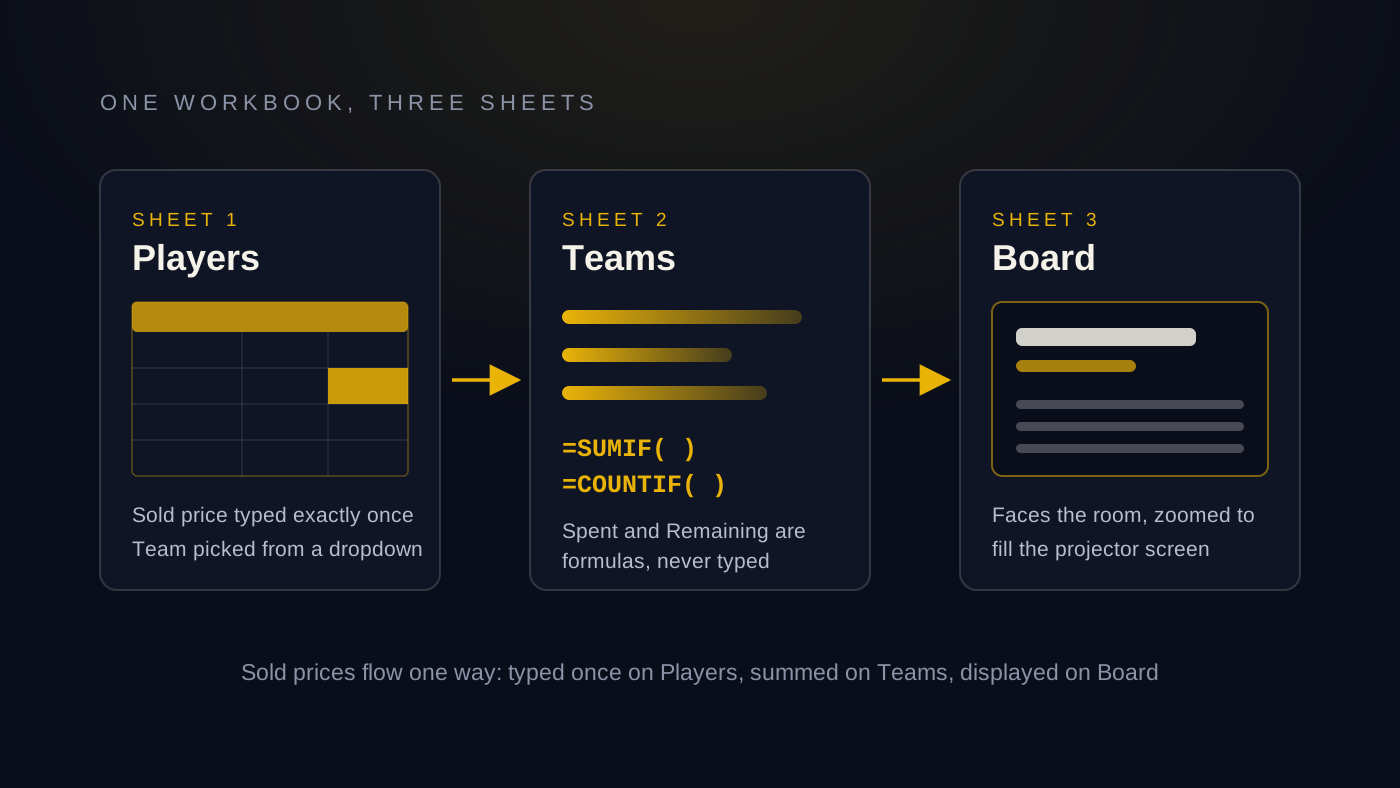
Search for a cricket auction Excel template and you will find a dozen downloads of unknown quality, half of them built for a different auction format than yours. Here is the better news: you do not need a download at all. A working auction sheet is three sheets, two formulas and a little conditional formatting. This article is the template. Read it once, open a blank workbook and you can build the whole thing in about ten minutes, and you will understand every cell of it, which matters at nine in the evening when a captain disputes a purse total.
We will build a player list, a teams sheet that tracks every purse automatically and a live board that faces the room. Then we will be honest about where a spreadsheet auction starts to crack, because it does, and about the point where purpose-built software earns its keep.
What your auction sheet has to do
Strip away the drama and an auction is bookkeeping done live. Your sheet has to answer four questions instantly at any moment of the night:
- Who is up next, and at what base price?
- Who bought whom, and for how much?
- How much has each team spent?
- How much does each team have left?
The last one is the one that ruins evenings. A captain told the wrong remaining purse will bid money they do not have, and unwinding that in a loud room is nobody's idea of fun. So the design rule for everything below is simple: sold prices get typed exactly once, and every total is calculated by formula from that single entry. No number is ever typed in two places.
Sheet one: the player list
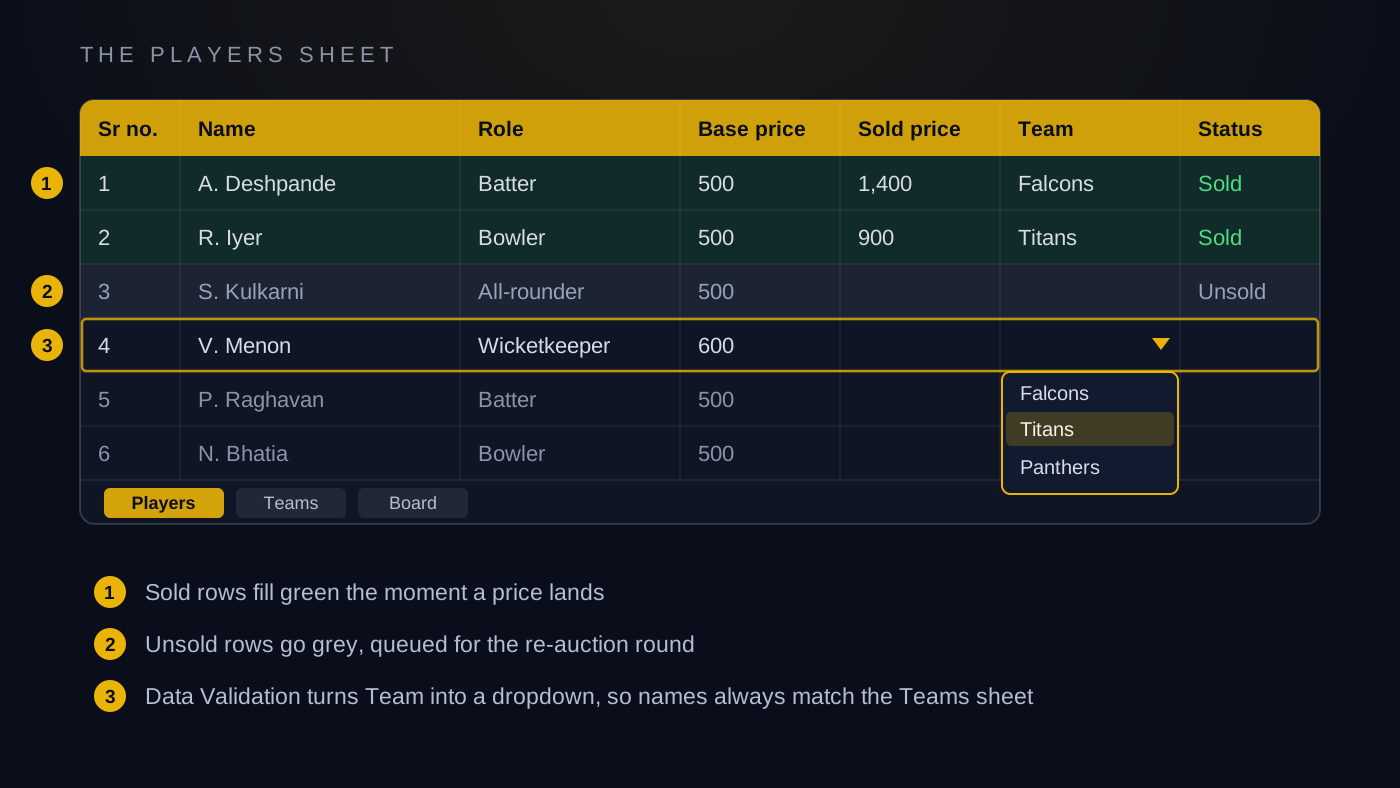
Create a sheet named Players with these columns, left to right:
- Sr no. A running number, useful for calling players in order.
- Name. The player's full name as registered.
- Role. Batter, bowler, all-rounder or wicketkeeper. Add batting or bowling style if your league cares.
- Base price. The starting bid for this player. Our guide to base price, purse and bid increments covers how to set these numbers.
- Sold price. Blank before the auction. The operator types the winning bid here.
- Team. Blank before the auction. The operator picks the buying team here.
- Status. Sold, Unsold or blank.
Two discipline rules for this sheet. First, the team name in the Team column must exactly match the team name on the Teams sheet, or the purse formulas will silently miss the entry. Protect yourself by making the Team column a dropdown: use Data Validation, point it at your list of team names and typos become impossible. Second, fill every base price before auction day, never during it.
Sheet two: teams and purses
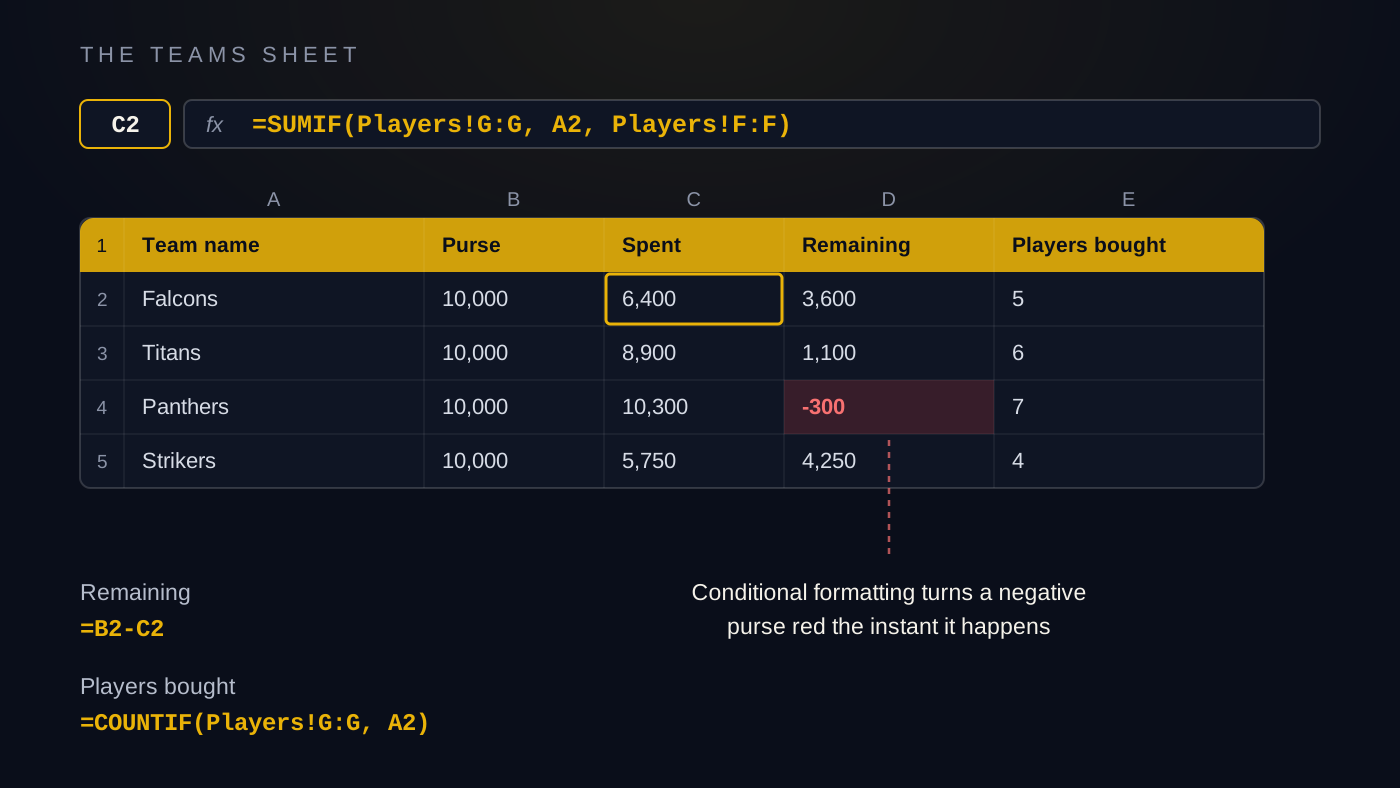
Create a sheet named Teams, one row per team, with these columns:
- Team name. Must match the dropdown on the Players sheet exactly.
- Purse. The full starting purse, the same number for every team.
- Spent. A formula, never typed.
- Remaining. A formula, never typed.
- Players bought. A formula, never typed.
The Spent formula in words: add up every sold price on the Players sheet where the team column matches this row's team name. In Excel that is one SUMIF. If your team name is in A2, sold prices are in column F of Players and team names in column G, it is =SUMIF(Players!G:G, A2, Players!F:F).
Remaining in words: purse minus spent. That is =B2-C2.
Players bought in words: count the rows on the Players sheet carrying this team's name. One COUNTIF: =COUNTIF(Players!G:G, A2).
That is the entire engine. When the operator types a sold price and picks a team, every purse updates itself. Nobody ever edits Spent or Remaining by hand, which is why we will lock those cells in a moment.
Add one safety net: conditional formatting on the Remaining column that turns the cell red below zero. A negative purse means someone bid money they did not have, and you want it glowing red the instant it happens, not discovered three players later.
Sheet three: the live board
The first two sheets are for the operator. The third is for the room. Create a sheet named Board and point a projector or TV at it.
Keep it big and simple. At the top, the current player: name, role and base price in a font readable from the back of the hall. Type these fresh for each player or pull them with a lookup keyed on the serial number of the player currently up. Below that, every team's name and remaining purse, pulled from the Teams sheet with plain cell references. Zoom until it fills the screen, then hide gridlines and headings under the View menu so it looks like a display rather than a spreadsheet.
The board matters more than first-timers expect. Captains bid with confidence when they can see every purse. Players stay engaged when they can see who is next. An auction with no board is a private meeting happening on one laptop.
Conditional formatting that carries the night
Three rules, all set up in advance:
- Sold rows turn green. On the Players sheet, when sold price is greater than zero, fill the row light green.
- Unsold rows turn grey. When status equals Unsold, fill grey, so re-auction candidates stand out. Unsold players should always get a second round, and our guide to running a cricket player auction covers how that round works.
- Negative purses turn red on the Teams sheet, as above.
With these three rules the sheet reads itself. Green is done, grey needs a second look, red is an emergency.
Operational tips that separate smooth from shambles
The template is the easy half. Operating it live is the hard half.
- One operator, one keyboard. Exactly one person types during the auction. The auctioneer talks, the operator types, nobody else touches the laptop.
- Freeze panes. Freeze the header row and the name column on the Players sheet so the operator never loses their place at row eighty.
- Protect the formula cells. Lock every formula column and protect the Teams sheet. The only editable cells in the workbook should be sold price and team.
- Do a full dry run. Two days before, push twenty fake sales through the sheet at speed and check the purses. Every formula bug found on Tuesday is one you do not find on Saturday night.
- Save constantly. Autosave on if you are in the cloud. If not, save after every sale and keep a copy on a second device.
Where the spreadsheet cracks, honestly
For a small auction, six or eight teams and forty-odd players in a calm room, this template genuinely works. It does not scale gracefully though, and the failure modes are predictable.
The room gets loud and the bids come fast. A player every ninety seconds gives the operator about ten seconds to type a price, pick a team and confirm both while three captains shout. One mistyped price or one wrong dropdown pick, and every purse total is quietly wrong until someone notices, usually mid-argument. There is no undo trail anyone trusts, so fixing it means stopping the auction and auditing rows while the room checks its phones.
Then there are the things a sheet simply cannot do. Captains at the back cannot check their own purse without shouting at the operator. Players at home cannot watch at all. And the board is a zoomed grid, not a show, when auction night deserves to look like an event rather than an accounts review.
When purpose-built software is worth it
Once you have more than a handful of teams, a big room or players watching remotely, purpose-built software stops being a luxury. AuctionXI exists precisely because of the failure modes above: every purse is tracked to the paisa and can never go negative, there is a fifteen-second undo for the inevitable wrong click, unsold players flow into a re-auction round and the room watches twenty ready broadcast scenes on the projector instead of a zoomed grid. Anyone can follow live on their phone through a viewer link with no cap on viewers, and at the end you export the full results as an Excel workbook, so you finish with a better version of the very sheet you started with. You even begin from your spreadsheet, since players bulk import from Excel with photos mapped automatically.
If you are weighing the two approaches properly, our comparison of free versus paid auction software goes deeper, and AuctionXI's pricing is pay once per tournament, not a subscription.
Either way, build the sheet. Even if you outgrow it, an organiser who has built the purse maths by hand understands their auction better than one who has not. Ten minutes, three sheets, two formulas. That is the whole template.