
The classic auction night has everyone in one room: captains at the front, players in the crowd, a projector on the wall. But plenty of leagues do not live in one room anymore. The alumni tournament has captains in four cities. The company league has half its players working from other offices. The society cup has NRIs who still want to own a team back home. For all of them the question is the same: can you run a proper player auction when the bidders are not physically together?

Yes, and it can be genuinely great. But a remote auction fails differently from an in-person one. In a hall, confusion is loud and gets fixed in seconds. On a call, confusion is silent, and by the time you notice, three players have been sold under protest. This guide covers the setup that works, the roles, the bid protocol and the pitfalls, whether you are fully remote or running a hybrid room.
The three layers of a remote auction
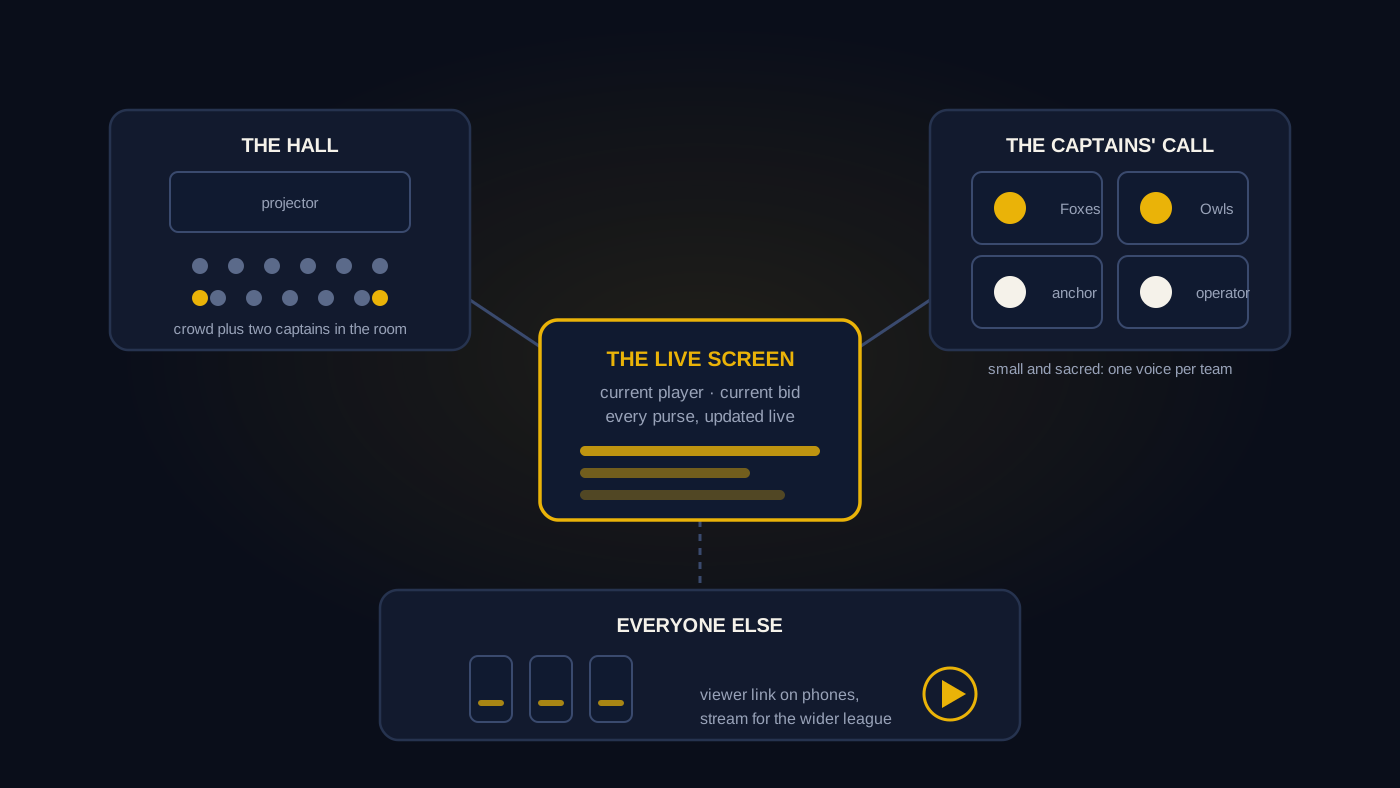
Think of the event as three separate audiences, each with its own channel. Mixing them up is where most remote auctions go wrong.
Layer one: the captains' video call
The bidders, one per team, live on a video call with the anchor and the operator. This is where the actual auction happens. Any mainstream video platform works. Keep this call small and sacred: captains, anchor, operator and nobody else. Every extra participant is background noise, a frozen video tile and a "sorry, was that a bid?" waiting to happen.
Layer two: the auction screen
The call is for talking. The screen is for truth. Every captain needs a live view of the auction state: who is up, the current bid, every team's remaining purse and squad. You can screen-share a spreadsheet, and for a small friendly auction that works. The weakness is that a shared screen is only as current as the last cell edit, and captains bidding on stale numbers is the single biggest source of remote auction disputes. This is the problem purpose-built platforms solve: with AuctionXI, every captain opens the live auction in their own browser and every bid and purse update appears on every screen in real time, so nobody is bidding against a number from thirty seconds ago.
Layer three: everyone else
Players and fans should not be on the captains' call. Give them their own window instead. Two good options, which you can run together:
- A viewer link on phones. AuctionXI generates a viewer link anyone can open on their phone to follow the bidding live, with no cap on how many people watch. Drop it in the league WhatsApp group and every player watches their own sale from their own sofa.
- A YouTube live stream. For the wider league, stream the auction to YouTube. If you want it to look like a broadcast rather than a screen recording, use a transparent overlay of the auction state on top of your stream. Our guide to broadcasting your auction on a projector and YouTube covers that setup step by step.
A hybrid auction is the same three layers with one change: some captains and a crowd are in a physical room with a projector, while the rest join the call. The room follows the projector, remote captains follow their own screens and the anchor treats both equally.
Roles: who does what
Remote auctions need the same two-person core as live ones, with sharper discipline.
- The anchor runs the call, introduces players, confirms bids verbally and calls sold. On a video call the anchor talks slightly slower and confirms more often than in a hall, because latency eats the start of sentences.
- The operator enters every sale and watches the screen state. The operator should not be the anchor. On a call, a single person doing both will mute themselves at the wrong moment at least once.
And on each team, exactly one decision-maker. This rule matters double in remote auctions. In a hall, a captain's co-owner whispering advice is charming. On a call, two people from one team unmuting with different bids is chaos. One voice bids for each team. Co-owners can sit beside the captain or run a private side chat, but only the named captain's bid counts.
The bid protocol: agree it before the call
In a hall, a raised hand is a bid. On a call you need a protocol, agreed in writing before auction day. The one we see work best:
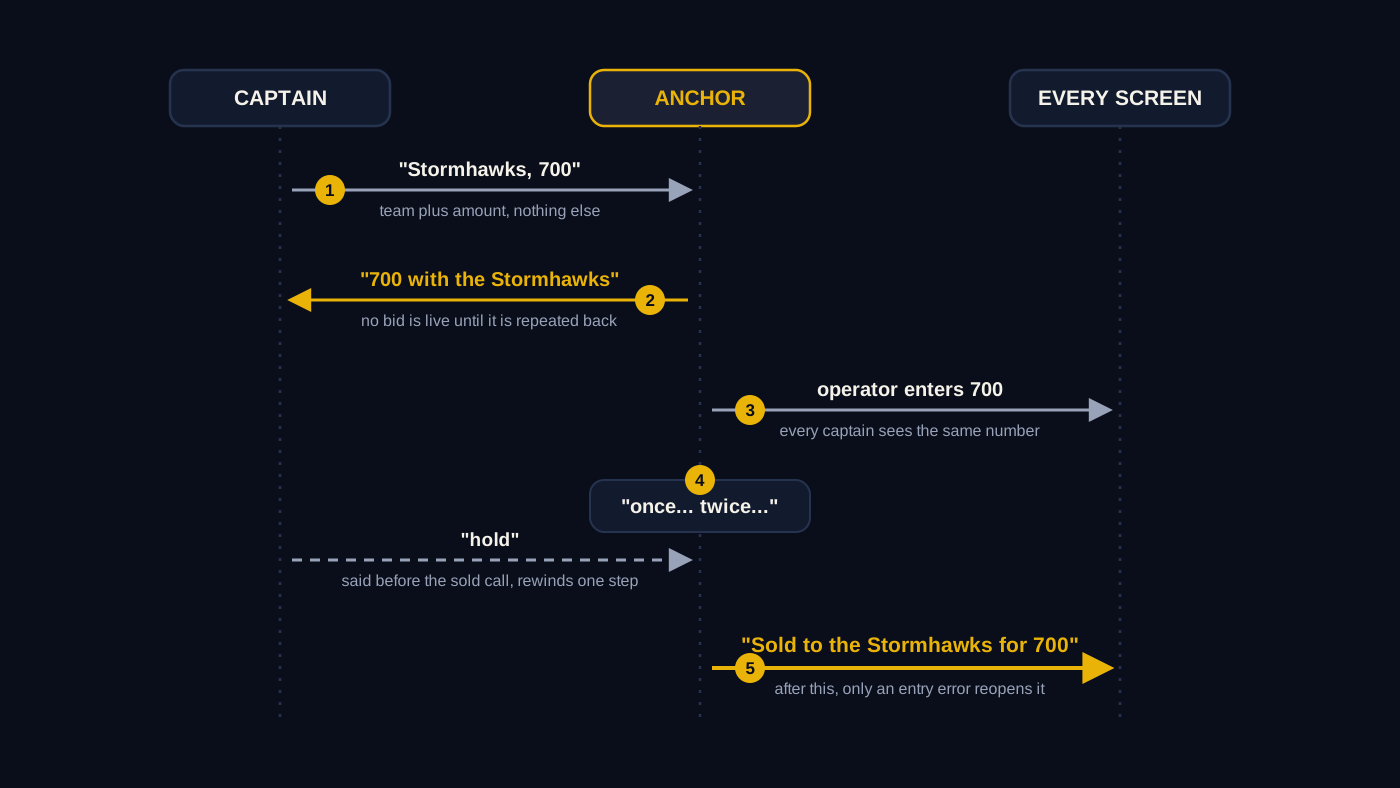
- Verbal bids only, in the format "team plus amount". "Stormhawks, 700." Not "yes", not "me", not a thumbs-up in the corner of a video tile.
- The anchor repeats every bid back. "700 with the Stormhawks." A bid is not live until the anchor confirms it. This single rule absorbs almost all latency problems.
- A fixed countdown. "Selling at 700... once... twice... sold." Same words, same rhythm, every player, so remote captains know exactly how much time they have.
- A dispute word. If a captain believes their bid was missed, they say "hold" before the sold call completes. The anchor rewinds one step. After sold, the sale stands unless the operator made an entry error.
On entry errors: they happen more on remote auctions because the operator is reading names off a call rather than a stage. A quick way to reverse a wrong entry matters, so agree with your operator beforehand how a mis-entered sale gets corrected and prefer a tool with an undo that fixes it before the next player comes up.
Pitfalls that sink remote auctions
- Lag treated as an afterthought. Somebody always has a bad connection. The protocol above is your insurance, but also do a five-minute test call the day before with every captain on the actual device they will use.
- Bidding off the video feed instead of the live screen. If captains only see the auction through a shared, slightly delayed video, they bid on old information. Give every captain a direct live view.
- No rules recap. Remote rooms cannot lean over and ask a neighbour. Open the call with a ninety-second recap of increments, purse and the bid protocol, exactly as you would on stage.
- Marathon pacing. Screen fatigue is real. Keep the whole event under two hours if you can, take one scheduled break and consider trimming the player pool or pre-assigning obvious base-price players. The preparation list in our auction day checklist applies to remote nights too, with the tech test added on top.
- Forgetting the audience. A remote auction with no viewer link is a conference call. The energy of an auction comes from players watching their own sale. Make sure layer three exists.
After the hammer
Remote leagues argue more after the auction than during it, simply because people were not in the same room to see things happen. Close that door with paperwork. Share the full results the same night: every player, every price, every purse. If your platform exports the complete auction as an Excel workbook, send it to all captains before anyone sleeps. Publishing the numbers immediately turns "I thought we had more purse left" into a settled question.
The honest summary
For a six-team friendly auction where all the captains know each other, a video call plus a carefully shared spreadsheet will get you through. As the league gets bigger, the money more real and the captains more competitive, the stakes shift to the screen: everyone needs the same live truth at the same moment, an audience needs somewhere to watch and mistakes need to be reversible. That is the gap remote auction software fills, and you can set up a tournament on AuctionXI and test the whole three-layer setup with your captains in an evening. Run the test call, agree the protocol, give every captain their own screen. Do those three things and the auction will feel closer than the distance suggests.